
Like many folks I use a credit card sleeve as my wallet. Super slim, simple, cheap. One issue with that is when paying for stuff you can't see the face of the card, so there tends to be some rummaging for the right one.
Inspired by one of my cards being yellow, and therefore easy to select: enter permanent markers, and some nail lacquer.
Different cards get different patterns and colours, and once dry, a coat of clear nail varnish (don't skip this bit, I found even permanent marker rubbed off after a few weeks). Voila: easy to find cards - once you learn which pattern is which of course.

0 Comments |
Back Links |


Recently I've started up a spare time upcycling hobby - making shelves out of knackered old suitcases.
While down in Florida clearing junk out of an old house I came across some cool looking old luggage: Moth eaten, corroded, not really suitable for travel any more. However, inspired by a post on Pinterest I had a go at converting them into shelves. I'm on my fifth set now, keeping one, selling the rest on my new Etsy 'shop'.
The process is pretty easy, after a bit of hit and miss refinement: Cut in half, wood glue down anything that's flapping, reinforce with timber (bracing across the join between lid and base), coat in shellac and attach hooks. This pic shows the back/inside:
0 Comments |
Back Links |
I recently splashed out for a new phone. With mobile contracts being what they are in the US (obscenely over-priced in a poorly regulated market) I decided to buy an unlocked phone outright, making it the most expensive thing I own, as well as being one of the things I'm most likely to lose - a dangerous combination.
Here's the three things I've done to help guard against that, two obvious, one hopefully interesting enough to justify this post:
- Installed tracking software. Prey in my (Android) case, but there's other options out there for all mobile OSs.
- Put my wife's phone number, an email address and a promise of a reward on the lock screen.
- Etched the same email address onto the body of the phone, using my wife's Dremel style grinder. Bit extreme I'll admit, but acceptable since I have no intention of ever selling the phone (it'll go to my wife if I ever upgrade) and also since I have a Samsung I can do it under the back cover so it doesn't make the phone look ugly. You could of course go to a professional engravers too.
Bang goes the warranty too of course, so you may wish to wait until that's run out for this:
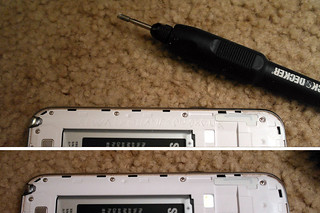
Bonus suggestion: Check the phone is covered by your home insurance. Last time I did this (in the UK) it cost no extra, but I did have to specifically list it (and anything else over a certain value). Even if it costs more it won't be as much as the dedicated insurance the carriers try and sell you.
Here's hoping Murphy's law doesn't lead me to drop it in the toilet the day after posting this. :-)
0 Comments |
Back Links |
Vancouver, like most North American cities has a block layout with back alleys for parking, refuse disposal, telegraph poles and other services. Also like many North American cities there's a culture of leaving things you don't want, but which someone else might next to the bins in these alleys for others to pick up. This appeals to my senses of environmental responsibility and general cheapness, so I often walk the alleys instead of the streets in case anything good's been left out.
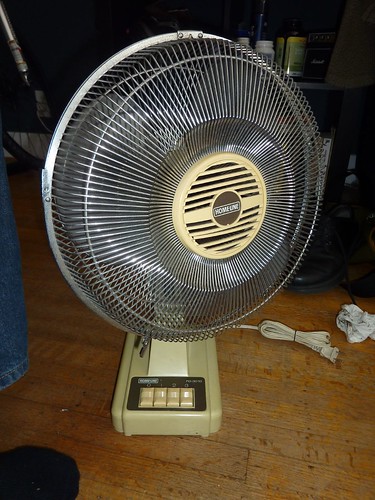
A few months back (during winter, naturally) I found a desk fan. It was next to the bin rather than in it, which is the signal that it was still working. It also satisfied my personal rule of only picking things up that aren't overly bedbug friendly, or at least are easy to inspect for the little critters.
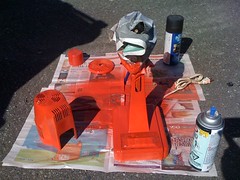
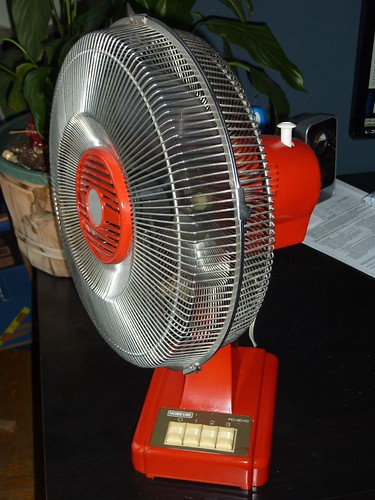
It worked of course, but it was pig-ugly, so I set about it with a can of Plastikote (or similar) and lo: Quite a nice little freebie for my desk.
Not sure what the overriding point is for this post, either 'reuse is better than recycle' or 'carefully spraying things a cool colour is an easy way to renovate them'. Take your pick.
And speaking of pics, here's the before, during and after shots:
0 Comments |
Back Links |
When I moved into my new place in the summer its only downside was it faced quite a busy road, and had old, ill-fitting, single-glazed windows.
After a couple of nights sub-optimal sleep I decided to have a go at fitting some secondary glazing, and, not wishing to spend proper money on a rental house I came up with quite a pleasing solution: $100 worth of plastic (polycarbonate to be precise, specially designed crystal clear for windows) sheeting and draft excluding tape from the local DIY store.
The photo tells the rest of the story, but one nice thing: Because the window frames have multiple bevels, I didn't need to cut the sheets to size down the sides, I just chose something roughly right, knowing one of the bevels would do to buttress against. A relief since cutting this stuff smoothly is almost impossible.
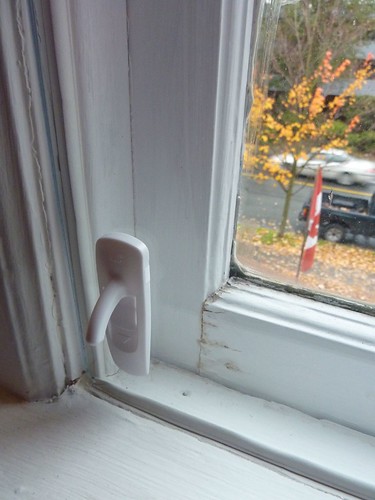
I've tested noise with and without, and compared to the proper double glazing in the sitting room and it seems about as effective - in so much as you can tell with a free iPhone decibel meter anyway. :-)
0 Comments |
Back Links |
About
Occasionally interesting, sometimes geeky, usually correctly spelt lifehacking tips 'n tricks from me, Mat, a British web guy working in Vancouver, Canada.
Previous
Archives
- December 2005
- January 2006
- April 2006
- June 2006
- July 2006
- November 2006
- January 2007
- March 2007
- August 2007
- February 2008
- June 2008
- July 2008
- October 2008
- December 2008
- June 2009
- August 2009
- October 2009
- November 2009
- February 2010
- May 2010
- June 2010
- July 2010
- October 2010
- November 2010
- December 2010
- January 2011
- March 2011
- June 2011
- August 2013
- February 2014
- May 2015
- Current Posts
Subscribe to
Posts [Atom]
Tag Soup elsewhere
If you liked this, you might also like: 
